Getting Steam64 IDs
Sometimes you'll need a player's Steam64 ID—like when adding them to your faction or property. The easiest way to find this is by using their Steam profile.
Step-by-Step
- Get the player’s Steam profile URL. It might look like this:
https://steamcommunity.com/id/asineth0- Add
?xml=1to the end of the URL, like so:
https://steamcommunity.com/id/asineth0?xml=1Open the link in your browser. You'll see a page of XML data.
Look for the
<steamID64>field and copy the number:
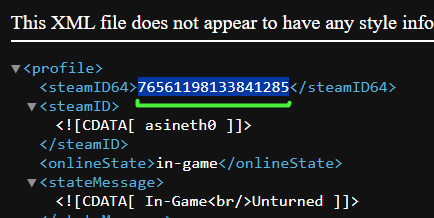
The final result should look something like this:
76561198133841285That's your Steam64 ID!